📡 Server Details
Server Name
Replica's Private Server (Xeon 18 Core) 1Gbit
Game
Soulmask
IP Address
65.21.173.74
Ports
10777
(Forest)
/
9777
(Sands)
Server Type
PvE (Player vs Environment)
Cluster
Yes — Cross-Map Travel Enabled
Status
🌿 Forest
Checking...
🏜️ Sands
Checking...
⚠️ Live status may not always be accurate.
For the most reliable results, check the
Forest ↗
or
Sands ↗
BattleMetrics pages directly.
Location
🇫🇮 Europe (Helsinki, Finland)
Timezone
Europe/Helsinki (EEST)
CPU
Xeon 18 Core
Connection
1 Gbit
Max Players
60
Password Protected
Yes — Available on Discord
🌐 Cluster Server — Cross-Map Travel
The server has been upgraded to a Cluster!
Both maps are now linked via portal travel.
When you first join, you can choose which map
to start on — simply connect to the port that matches your preferred
starting zone.
🌿 Cloud Mist Forest (Main Island / Forest Map)
- 🖥️ Server 1 — Direct Connect:
65.21.173.74:10777
- Join this port to begin your adventure on the Main Island Forest map
🏜️ Shifting Sands (DLC Map)
- 🖥️ Server 2 — Direct Connect:
65.21.173.74:9777
- Join this port to begin your adventure on the Shifting Sands map
🗺️ Your Choice — Start on Any Map!
When joining for the first time, simply connect to whichever port matches
the map you want to start on. Both servers are part of the same cluster,
so your progress is shared across the network.
| Map |
Direct Connect |
|
🌿
Main Island / Forest
|
65.21.173.74:10777 |
|
🏜️
Shifting Sands
|
65.21.173.74:9777 |
🔀 SWITCHING MAPS AFTER YOU START:
💡 If you wish to travel to the other map after your
first session, you will need to locate the
Cross-Server Portal in-game.
❌ Your starter character
CANNOT use the portal
✅ Only a Tribesman
can travel between maps
💡 Recruit a Tribesman and send them through the portal
to explore the other world!
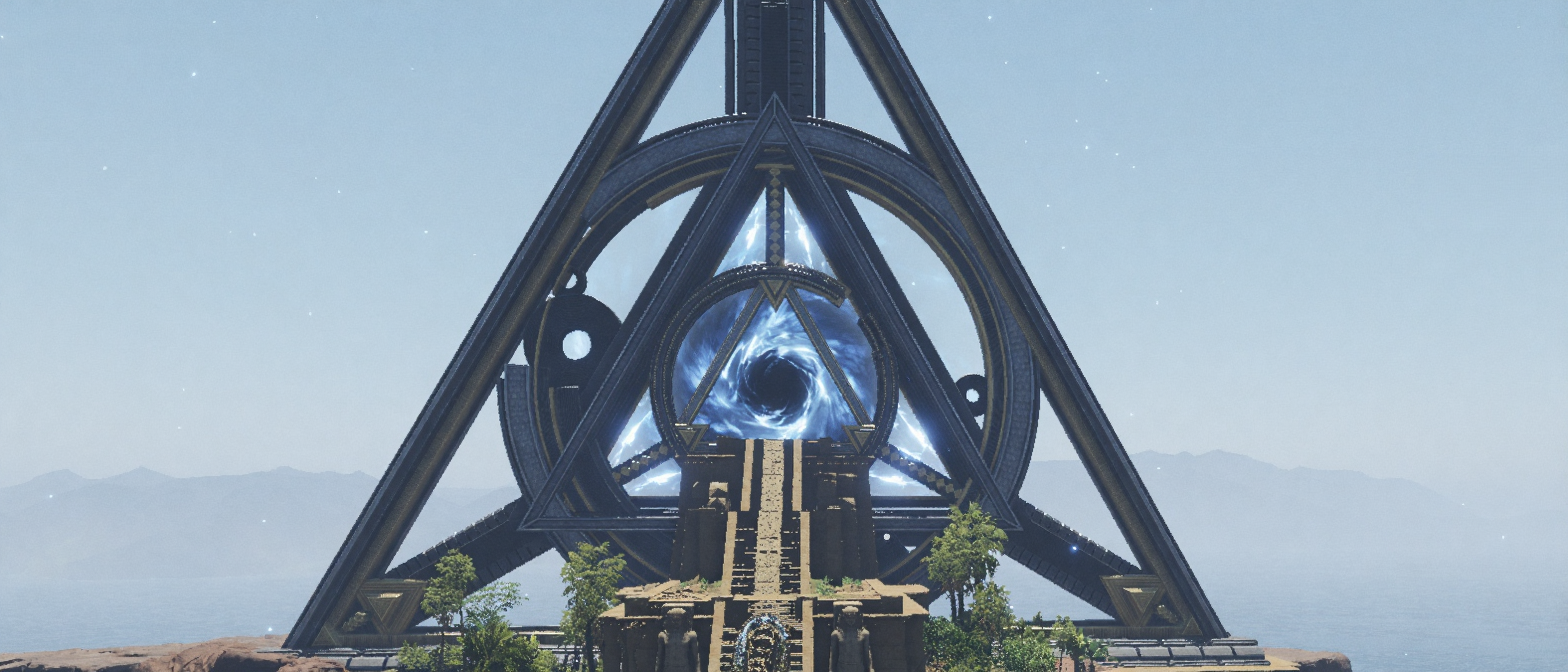
📸 What the Cross-Server Portal looks like in-game — click to enlarge
📋 Server Automation & Maintenance
🔄 Automatic Update Checker
- Monitors Steam every 10 minutes
for Soulmask updates
- When an update is detected:
- ✅ Both servers are notified automatically
- ✅ A 15 minute
countdown begins with warnings sent to all players in-game
- ✅ Server 2
(Shifting Sands) saves & shuts down first
- ✅ Server 1
(Cloud Mist Forest) saves & shuts down 20 seconds later
- ✅ Servers automatically update and restart
🕖 Daily Restart — 2:00 AM EET (Finland)
- Both servers perform a scheduled daily restart every night
- When the restart begins:
- ✅ Both servers are notified automatically
- ✅ A 15 minute
countdown begins with warnings sent to all players in-game
- ✅ Server 2
(Shifting Sands) saves & shuts down first
- ✅ Server 1
(Cloud Mist Forest) saves & shuts down 20 seconds later
- ✅ Servers automatically restart after the
update check
⏳ Server Startup Order
- When servers restart (after updates or daily restart):
- 1️⃣ Shifting Sands
(Server — Port 9777) starts up first
- 2️⃣ Cloud Mist Forest
(Server — Port 10777) starts up
5 minutes later
⚠️ If you are on Cloud Mist Forest, please allow extra time after a restart!
⚙️ Technical Details
🖥️ Server Infrastructure
- 🖥️ Server 1 — Cloud Mist Forest
(Main) — 65.21.173.74:10777
- 🖥️ Server 2 — Shifting Sands
(DLC) — 65.21.173.74:9777
- 🔒 Duplicate run protection enabled on all scripts
- 📝 All actions are fully logged with timestamps
- ⏰ Server timezone:
Europe/Helsinki (EEST)
📜 Server Rules
- Be respectful to all players
- No griefing or destroying other players' builds
- No exploiting bugs or glitches
- Keep builds reasonable — no server-lagging mega-structures
- No hate speech, racism, or toxic behavior
- Have fun and help each other!
🔌 How to Connect
-
1
Join our Discord to get the
server
password. The password is required to connect and is only
shared within our community.
🎮 Join Discord for Password ↗
-
2
Open Soulmask and navigate to the
server browser from the main menu.
-
3
Click the
"Connect to the server directly" button in the server browser.
-
4
Enter the
IP address and select
your
map port based on which
world you want to start on:
| 🌿 Main Island / Forest |
IP: 65.21.173.74
|
Port: 10777
|
| 🏜️ Shifting Sands |
IP: 65.21.173.74
|
Port: 9777
|
-
5
When prompted, enter the server
password obtained from our Discord and click
Join to connect.
💡 Tip — Switching Maps Later:
You are free to start on either map. If you wish to switch maps after your
first session, locate the Cross-Server
Portal in-game and use one of your
Tribesmen to travel to the other world.
Note that your starter character cannot
use the portal — only recruited Tribesmen can cross between maps.
🎮 Join Discord for Password
💡 Player Notice
Players will always receive in-game
warnings before any restart or shutdown. You will never be kicked
without notice — the system provides a full
15 minute countdown with multiple warnings
so you can save your progress and find a safe location.